Menulet Management

May 4, 2012 on 6:09 pm | In Advice, Kool Stuff, Mac Software | No Comments

If you have a lot of icons at the top of your menu bar and it has become confusing for you, check out this very cool app called Bartender. Currently in beta (but working quite well), Bartender hides menulet icons in it’s own submenu. I’ve put the menulets I rarely use into this Barender drop down making my desktop more tidy. Really nifty. Plus it’s 50% off right now while it’s in beta.

You don’t need this software to remove menulets. If you hold the COMMAND key while dragging a menulet you can reposition it amongst the others or drag it off the bar and “poof” it will remove it from the bar.

Stream videos from your Mac to AppleTV

January 30, 2012 on 7:59 pm | In Advice, General, Kool Stuff, Mac Video, Tips and Tricks | No Comments

If you’ve been looking for a way to playback videos from YouTube, Vimeo, etc to your AppleTV from your MacBook/Mac Pro then you need to download two extensions for Safari.

First you will need “Click to Plugin”. This turns off instant loading of Flash,WMV,PDF,and any other kind of video/audio plugin you can think of. You will want to immediately go to the preferences and enable certain ones to always pass through (like Google Maps for instance).

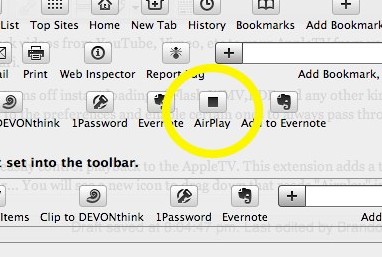
Second, you will need “Media Center” to easily control playback to the AppleTV. This extension adds a toolbar icon that you can add by going to (Safari) View/Customize Toolbar… You will see a new icon to drag down that reads “Airplay” in the shape of a square. Too bad it’s not the familiar Airplay icon we’re used to, but no matter. It works!

Then when you go to a YouTube page that movie will be loaded via HTML5. Pressing the “F” key will play it fullscreen. A floating menu gives you the option to stream it to Airplay, download the file, change the source and more options. It’s really fantastic.

For more information consult the author’s page and this blog post from MacStories.

GPS locator for your stolen MacBook

April 15, 2010 on 3:34 am | In Advice, Kool Stuff | No Comments

If you’ve ever had your MacBook stolen you’ll be very interested in the software. It’s called Undercover. Think of it as a LoJack system for your MacBook. Should your computer get stolen you’ll be able to track it. The software, which is only $50, will send you photos every eight minutes of whomever is using . It will also emulate a fake kernel panic indicating the computer needs to be taken in for service. All this happens by simply logging into the Undercover website and flagging the computer as stolen. It will even triangulate the location of the MacBook using the skyhook wireless technology which is similar to what is in the iPhone.

So now there’s no reason you can’t leave your MacBook running at Starbucks and go use the restroom for 20 minutes. Of course recovering your computer would be quite a drag.

Drobo version 2

September 20, 2008 on 9:38 am | In Kool Stuff | No Comments

So you’ve got a hard drive and it died. Was it a La Cie? Then of course it died! Well, now you’ve got the FEAR that your other drives will die, too. And, well… I hate to tell you this but they will. All drives die eventually. The ones to fail faster than other brands are Western Digital drives (in my experience) That’s why they come with a 1 year warranty and are such a good deal at Best Buy. But they are cheap you say. You pay for what you get.200809191037.jpg

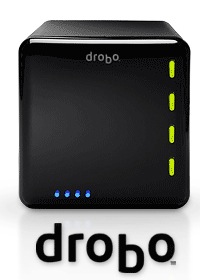
So what should I buy? Invest in a Drobo. It’s a hard drive housing that stores up to 4 hard drives and combines all the drives together into 1 large volume. Should one of the drives fail the others take over until you can put a new drive in. It can even survive if two drives fail. The best thing about this is you should never lose data. However, what you won’t read is that a Drobo’s data can become corrupted so it’s best to maintenance the drive with diskwarrior now and then.

If you put four 1TB hard drives in the Drobo will format them to 2.7TBs. A lot of the extra space is reserved for data recovery in case one of the drives dies. What’s nice to know is that when larger drives come out you will be able to put a new drive into your drobo. So when 2TB drives are sold you can swap out a 1TB for the new one. Nifty. This means you won’t have to keep shuttling your data around. It GROWS with you.

They cost $499 and are pretty freaking awesome. Check out the drobolator to see how it’s configured.

Noah video

October 7, 2006 on 6:21 pm | In Kool Stuff | No Comments

I found this on Youtube.com. Wow. This guy photographed himself everyday for six years. Watch this.

Max the couchmaker

September 29, 2006 on 11:42 pm | In Kool Stuff | No Comments

My couch needed repair so Max, a friend of Tony (the apartment handyman), came over to fix it. He saw my Alvarez steel string and couldn’t resist!

If you need a good carpenter call Max. 323-384-5088.

Max-El-Mariachi

Totally Unrelated Relation

September 28, 2006 on 12:49 pm | In Kool Stuff | No Comments

Here’s my father, Stan, in two commercials for his store which is closing its doors after 30 years. :(

If you drive thru Wabash, Indiana (first electrically lighted city in the world) then stop on by and say hello.

1-2

2

Technorati Tags:

Electrical Overload

September 27, 2006 on 3:37 pm | In Kool Stuff | No Comments

This is real!
Electrical Overload

Powered by WordPress with Pool theme design by Borja Fernandez.
Entries and comments feeds. Valid XHTML and CSS. ^Top^