Stream videos from your Mac to AppleTV
January 30, 2012 on 7:59 pm | In Advice, General, Kool Stuff, Mac Video, Tips and Tricks | No CommentsIf you’ve been looking for a way to playback videos from YouTube, Vimeo, etc to your AppleTV from your MacBook/Mac Pro then you need to download two extensions for Safari.
First you will need “Click to Plugin”. This turns off instant loading of Flash,WMV,PDF,and any other kind of video/audio plugin you can think of. You will want to immediately go to the preferences and enable certain ones to always pass through (like Google Maps for instance).
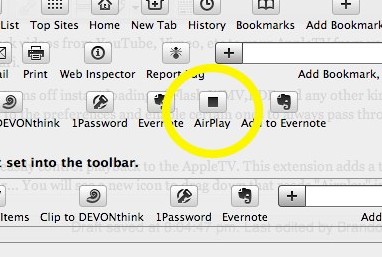
Second, you will need “Media Center” to easily control playback to the AppleTV. This extension adds a toolbar icon that you can add by going to (Safari) View/Customize Toolbar… You will see a new icon to drag down that reads “Airplay” in the shape of a square. Too bad it’s not the familiar Airplay icon we’re used to, but no matter. It works!
Then when you go to a YouTube page that movie will be loaded via HTML5. Pressing the “F” key will play it fullscreen. A floating menu gives you the option to stream it to Airplay, download the file, change the source and more options. It’s really fantastic.
For more information consult the author’s page and this blog post from MacStories.

Fixing File Permissions
October 11, 2006 on 2:52 am | In Advice, Mac Video, Tips and Tricks | No CommentsYou ever have a folder that won’t let you copy anything into it? Or maybe you can read everything in the folder except one file? Well, you can remedy this situation either by using the GET INFO command from the file menu in the Finder or by using Batchmod. It’s a small utility that easily rewrites permissions. I’ve included a training video.
Transfer Address book from Entourage to Mail program
September 29, 2006 on 3:00 am | In Mac Video | 1 Comment
Powered by WordPress with Pool theme design by Borja Fernandez.
Entries and comments feeds.
Valid XHTML and CSS. ^Top^


